Value Of
Returns the value of a selected variable.

Description
The Value Of block returns the value of a selected variable. This is a code block part of the Variables drawer.
Usage
Returns the value of a selected variable.
Syntax
Inputs in this block:
- A variable from the dropdown menu
Example
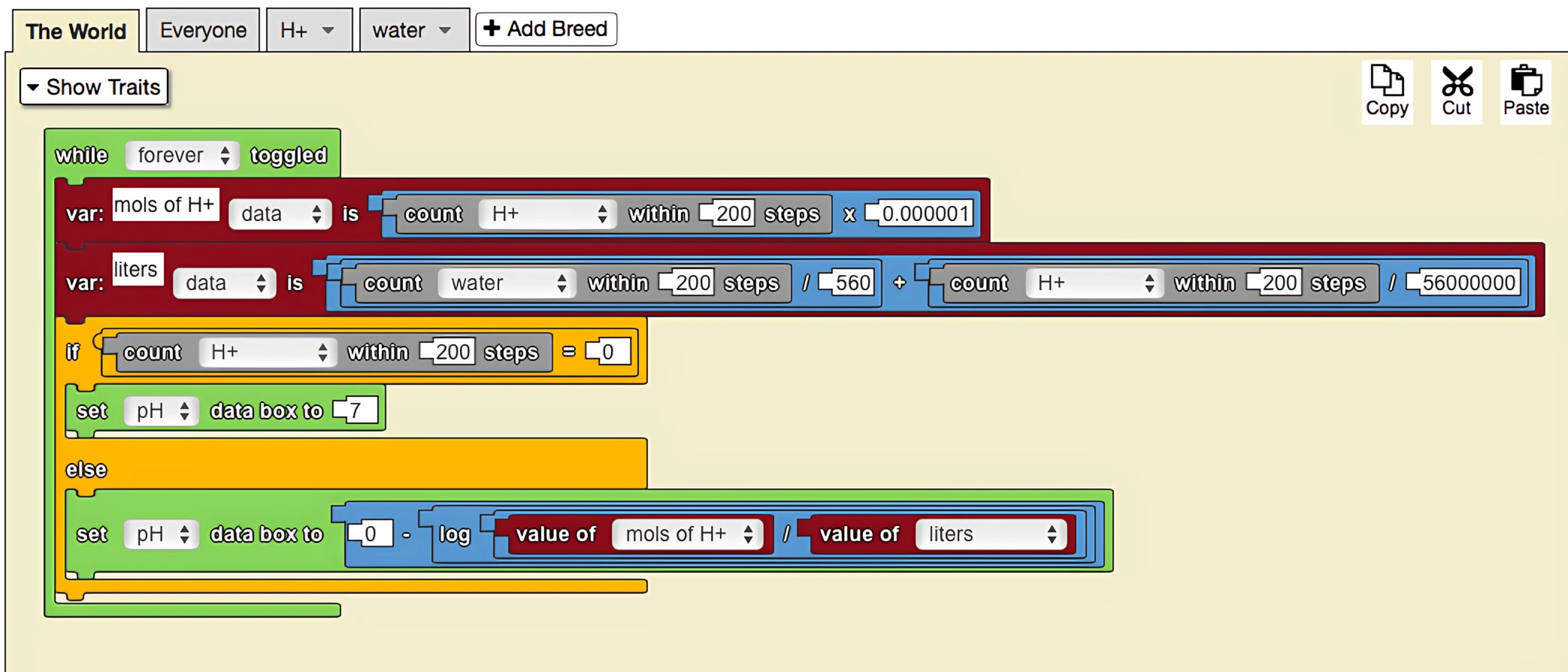
This model demonstrates the change in pH of a solution as base is added. Since each H+ agent represents one millionth of a mol of H+, so the 'count H+ within 200 steps' block is being multiplied by 0.000001. The 'count water within 200 steps' has been divided by 560 because each water molecule represents a tenth of a mole, of which there are approximately 56 in a one liter solution. (The solution is one liter at the start of the model, but gains volume as more acid is added to it.) Variables have been utilized in this simulation to keep track of the amount of H+ in the solution and also the total liters of liquid in the solution. This increases the readability of the pH equation.
Notes
The Value Of block is used to retrieve the current value of a variable for use in calculations, conditions, or other operations.