Set World To
Sets the value of a selected world trait. World traits can be created by adding a new trait to the World breed in the breed manager.
To add a new trait to the World breed, go to The World tab and click on the show traits button. Then, select "add custom trait."

Description
The Set World To block sets the value of a selected world trait. World traits can be created by adding a new trait to the World breed in the breed manager. This is a code block part of the Environment drawer.
Usage
Set World To is used to set traits of the world in a similar way to agents.
Syntax
Inputs:
- A world trait from the dropdown menu
- A number

Example
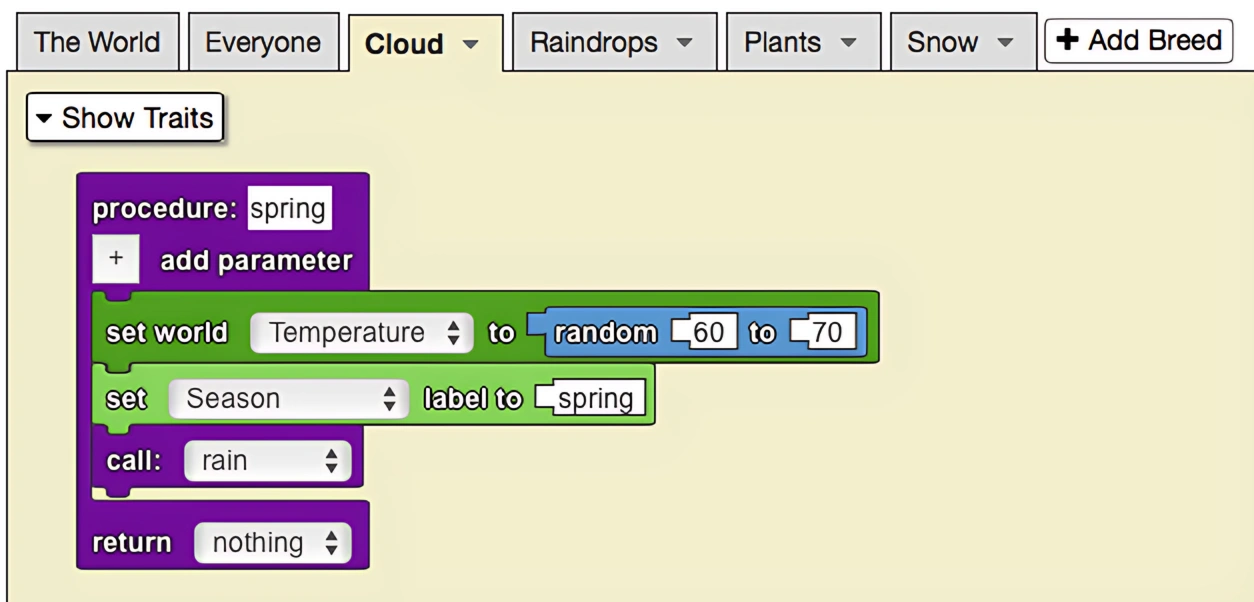
The model below is of plant growth throughout the four seasons. The World trait temperature depends on the season. All of the seasons have different temperature ranges, using the 'set to' block to set a random temperature in that range. The plants in the simulation react both to the temperature of The World, and the precipitation that falls during winter and spring.
Notes
This block is used to solely modify custom traits of the world. The traits of agents are modified using the Set My To block.
Related Blocks
- World Trait - Gets the value of a world trait
- Set My To - Sets the value of an agent trait