Count Within Steps
Provides the number of agents of a selected breed within a specified radius of itself. Use 200 steps to cover the entire terrain.

Description
The Count Within Steps block provides the number of agents of a selected breed within a specified radius of itself. This is a code block part of the Detection drawer.
Usage
Count Within Steps is used to provide the number of agents of a selected breed that exist within a given step limit in Spaceland.
Syntax
Inputs in this block:
- A breed from the dropdown menu (to count)
- A number into the socket (radius in steps)

Example
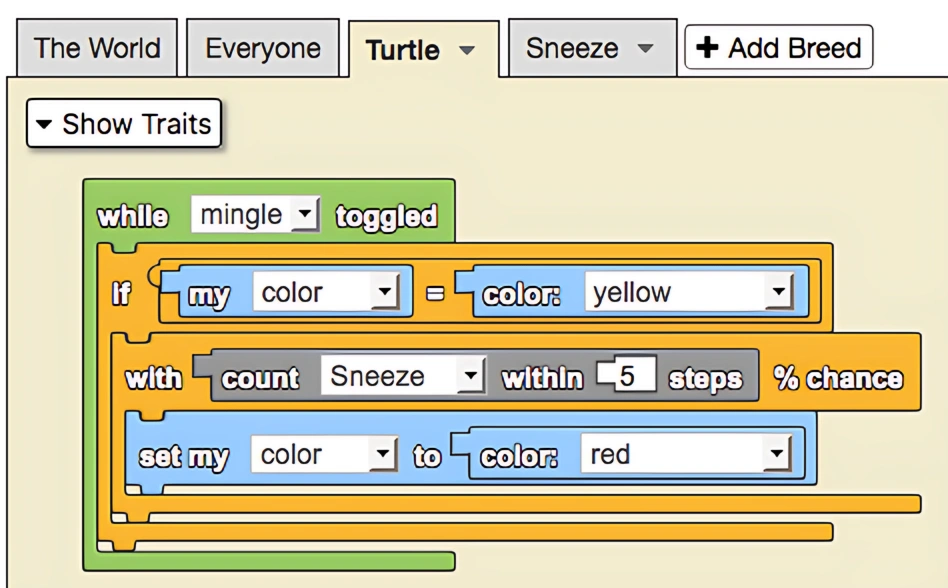
While the 'mingle' button is toggled on, agents with the color red are treated as having a disease and will spread that disease by sneezing. Agents proximal to the sneeze particles, as detected by the 'count within' block, will be more likely to contract the disease.
Common Uses
A common use of the Count Within Steps block is to monitor the total population of agents of a select breed. To do this, simply ask The World agent to count the number of agents within some large number of steps (400 will do).
Notes
The radius is measured in "steps" which correspond to the distance units in Spaceland.
Related Blocks
- Count Within Steps With - Counts agents with additional trait filtering