Count Within Steps With =
Returns the number of agents of a selected breed with a specified trait within a specified radius of itself.

Description
The Count Within Steps With = block returns the number of agents of a selected breed with a specific trait value that exist within a given step limit in Spaceland. This is a code block part of the Detection drawer.
Usage
Count Within Steps With = is used to provide the number of agents of a selected breed AND specific trait that exist within a given step limit in Spaceland.
Syntax
Inputs in this block:
- A breed from the first dropdown menu
- A number in the first input box (radius in steps)
- A desired trait from the second dropdown menu
- A value of trait to check for in the second input box

Example
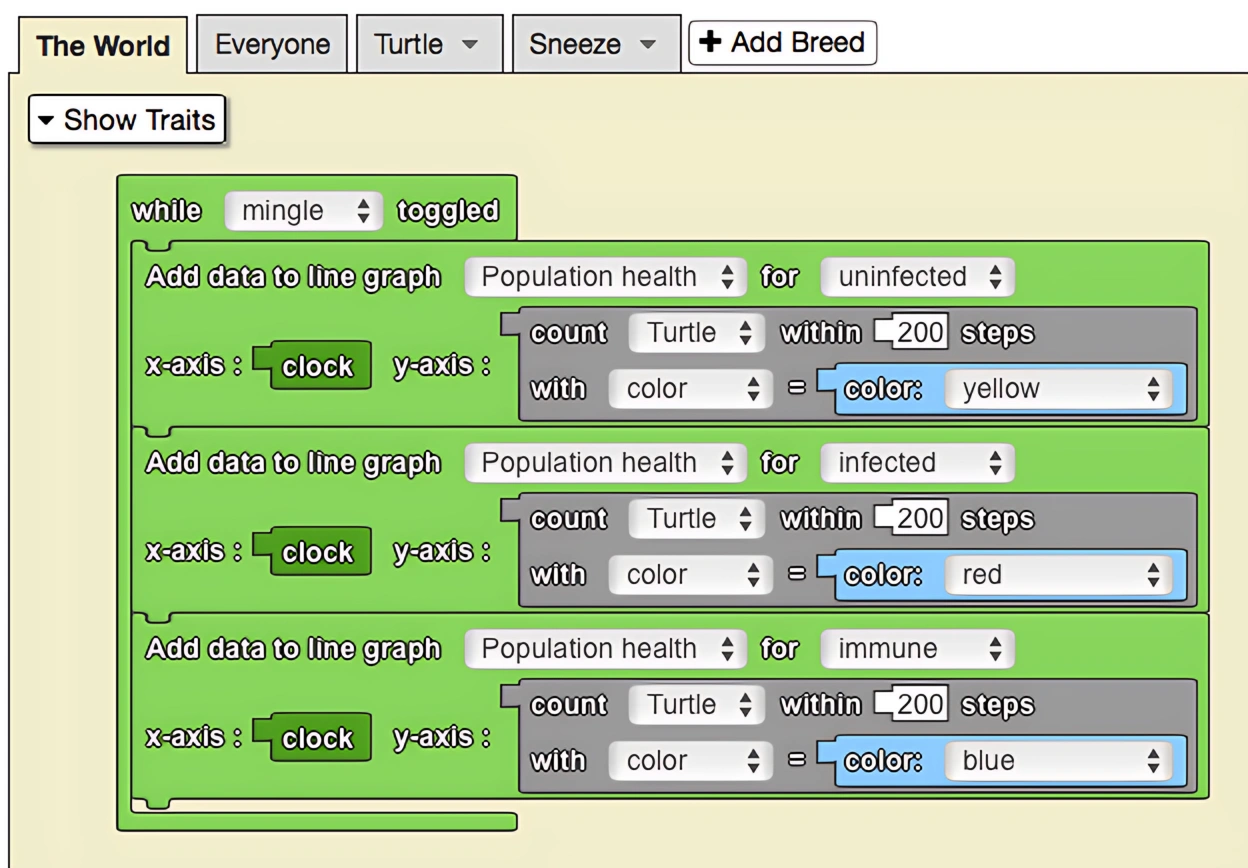
In this model, an epidemic has broken out in a population. Yellow agents are uninfected, red agents are infected, and blue agents are immune. Red agents spread the disease by sneezing, and yellow agents can catch the disease by coming into contact with sneeze particles created by red agents. The line graph to the left of spaceland keeps track of the total amount of infected, uninfected, and immune agents in the population, by using the 'count within with' block. Since the coordinates of spaceland range from (-50, -50) to (50, 50), it is more than sufficient to count within 200 steps.
Common Uses
A common use of the Count Within Steps With = block is to monitor the total population of agents of a select breed AND trait. To do this, simply ask The World agent to count the number of agents within some large number of steps (400 will do).
Related Blocks
- Count Within Steps - Counts agents without filtering by trait