Color RGB
Returns a color made by blending numerical values of red, green, and blue. Refer to an RGB chart to obtain specific colors.

Description
The Color RGB block returns a color made by blending numerical values of red, green, and blue. Refer to an RGB chart to obtain specific colors. This is a code block part of the Traits drawer.
Usage
This block will create a color with an amount of red, green, and blue in it as specified by the input values.
Syntax
Inputs in this block:
- First input: a number less than or equal to 255, for the red value
- Second input: a number less than or equal to 255, for the green value
- Third input: a number less than or equal to 255, for the blue value
Example
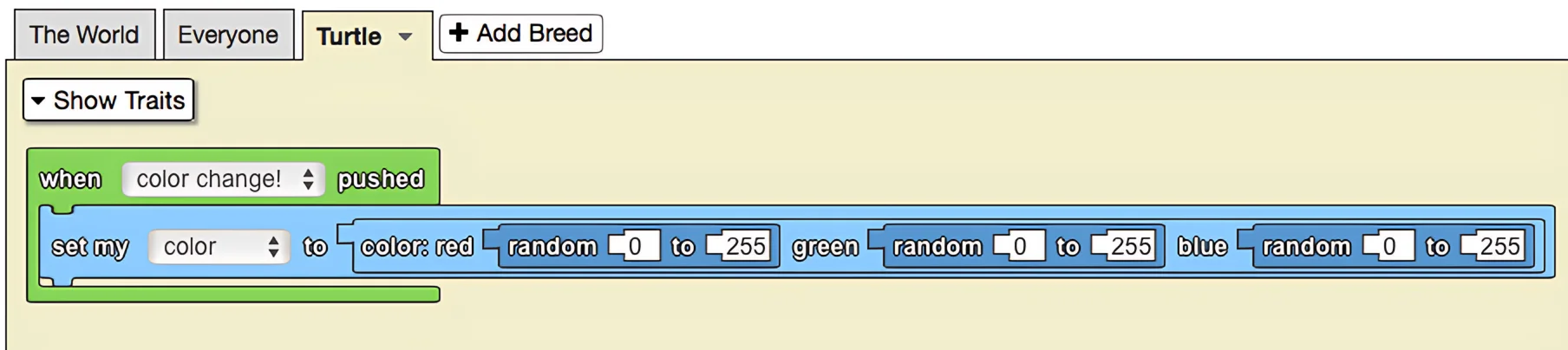
The model above depicts colorful turtles wandering throughout spaceland. The color of these turtles can be changed to a random value using a created button: 'color change!' Whenever that button is pushed, the turtle agents change their color to a random value. Take note that by using the red green blue block, there is a much wider spectrum of color available compared to simply using built in colors.
Notes
The Color RGB block provides precise control over colors by specifying RGB values from 0-255 for each color channel. This allows for a much wider range of colors than the built-in color options.