Set My To
Sets the selected trait of an agent to the value of the input.

Description
The Set My To block sets the selected trait of an agent to the value of the input. This is a code block part of the Traits drawer.
Usage
Sets the selected trait of an agent to the value of the input.
Syntax
Inputs in this block:
- First input: a type of trait from the dropdown menu
- Second input: a number or a trait block of the selected type
Example
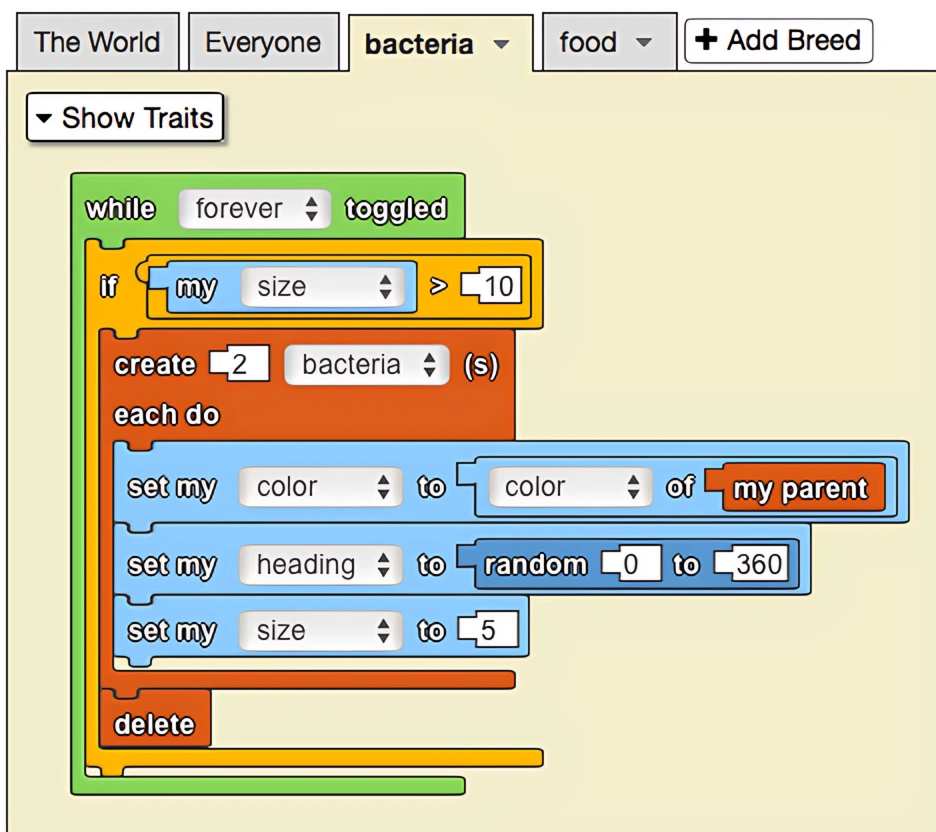
This is a model of bacterial growth and reproduction. Bacteria eat small spherical 'food' agents so they can grow. After eating a sufficient amount, the bacteria will undergo mitosis and split into two new bacterial cells. Each lineage of bacteria has its own color.
Notes
The Set My To block is used to modify an agent's own traits during runtime, allowing for dynamic behavior changes and state management.