Clock
Returns the value of the clock, measured in "ticks". This value increments by 1 during each iteration of the code, which is 5x per second at normal speed.

Description
The Clock block returns the value of the clock, measured in "ticks". This value increments by 1 during each iteration of the code, which is 5x per second at normal speed. The speed that the clock increments is determined by the value of the engine speed slider. A slider value of n makes the clock tick n times per second. The clock starts at zero when the program is initiated. This is a code block part of the Environment drawer.
Usage
Clock refers to the value of the clock, measured in "ticks". This value increments by 1 after each iteration of the code. The speed that the clock increments is determined by the value of the engine speed slider. A slider value of n makes the clock tick n times per second. The clock starts at zero when the program is initiated.
Syntax
This block has no inputs.
Returns: clock
Common Uses
Mainly used to simulate the passing of time in simulations, and to prompt certain actions to take place during certain points in time.
Example
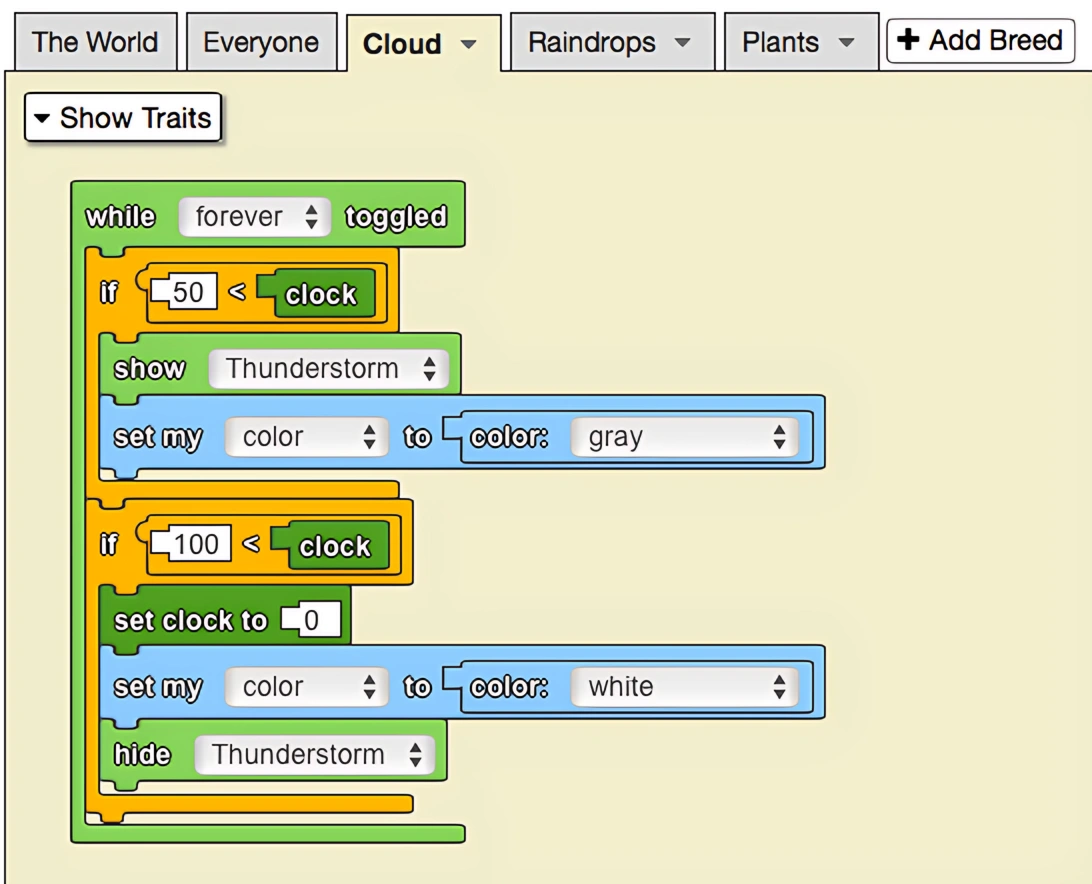
The model below depicts flowers growing with the rainfall over time. The clock is used to determine when thunderstorms start and stop: it will rain between 50 and 100, after which the clock will be reset to 0. In all, there are 50 ticks of rain followed by 50 ticks of no rain.
Notes
The clock value is global and shared across all agents in the simulation.
Related Blocks
- Set Clock To - Resets the clock to a specific value